
Outscape: Online Car Simulator
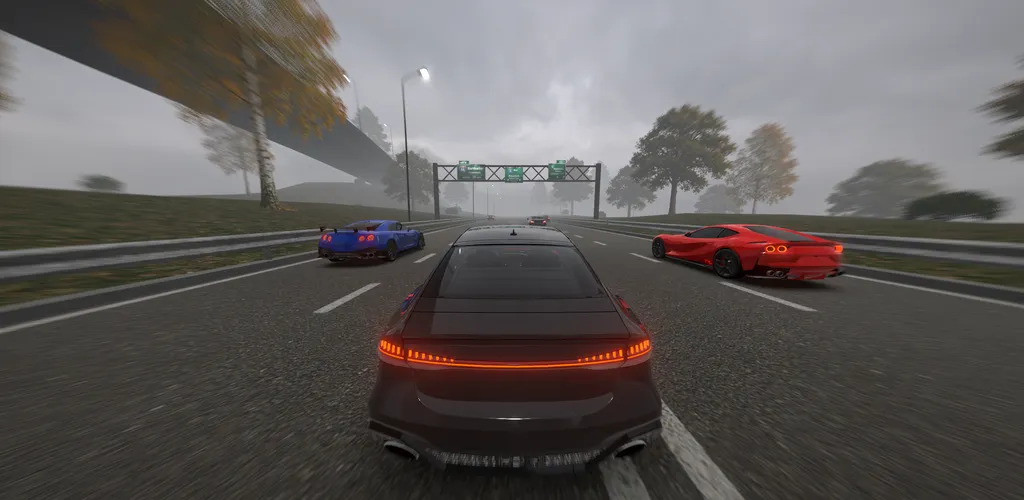
Welcome to Outscape – the ultimate online car driving simulator for mobile! Race with friends in multiplayer rooms, cruise endless highways in offline mode, and build your dream garage. Outscape is not just a car game – it is a realistic driving experience with stunning graphics, detailed interiors and smart traffic. 🌐 ONLINE MULTIPLAYER & OFFLINE MODE Create rooms, drive with friends and other players in real time. Private rooms with password up to 10 players. No internet? Play the full offline simulation anywhere – no limits, no timers. 🚗 REALISTIC DRIVING PHYSICS Feel the weight and handling of every vehicle. Sports cars, sedans and supercars behave differently on the asphalt. Master braking, overtakes and high-speed traffic racing. 🛣️ ENDLESS HIGHWAY & SMART TRAFFIC Dive into dense AI traffic, weave between lanes and pull off daring near-misses to earn cash and points. Day, night and rain weather with wet asphalt and real-time reflections. 🏠 GARAGE & DEEP CAR CUSTOMIZATION Store up to 4 cars in your garage and tune every detail: Paint: body colors and paint styles Wheels: different rim designs Calipers: brake caliper colors Lights: headlight color and position lights Earn money for every kilometer and every near-miss. 🎮 FIRST-PERSON COCKPIT VIEW Sit inside the car: hands on the wheel, working multimedia screens, detailed dashboard and ambient lighting. Switch cameras: cockpit, hood, third-person or drone view. 📸 PHOTO MODE Frame the perfect shot with zoom, blur and tilt – and save it to your device. Show off your tuned car in rain, fog or at night! 🏆 DAILY TASKS & GLOBAL LEADERBOARDS Complete daily challenges, claim rewards, set records in distance and near-misses, and climb the global leaderboard. 🌍 12 LANGUAGES SUPPORTED English, Ukrainian, Russian, German, French, Spanish, Portuguese, Turkish, Italian, Polish, Chinese, Japanese. KEY FEATURES: Online multiplayer rooms + full offline single player Realistic car simulator physics and dense traffic First-person cockpit with detailed interiors Deep tuning: paint, wheels, calipers, lights Drone photo mode with save to gallery Daily tasks, records and global leaderboards Rain, night and day conditions Smooth mobile controls: buttons, steering wheel or keyboard Download Outscape: Online Car Simulator now – drive solo offline or race with friends online!
游戏精选截图与实机展示
点击截图可放大查看高清原始画质
版本与技术参数规格
版本与渠道变体
同一游戏在各渠道的真实版本与包大小
资源校验值(SHA-256)
核对下载文件是否与资源提供方一致
123云盘v0.1.1
SHA-256:330519c89f96…7c81a110
校验值来自资源提供方。下载完成后可在本地执行 sha256sum(Windows 用 certutil -hashfile)并与上方完整值比对。
最新更新 (What's New)
游戏深度介绍 (About this Game)
Welcome to Outscape – the ultimate online car driving simulator for mobile!
Race with friends in multiplayer rooms, cruise endless highways in offline mode, and build your dream garage. Outscape is not just a car game – it is a realistic driving experience with stunning graphics, detailed interiors and smart traffic.
🌐 ONLINE MULTIPLAYER & OFFLINE MODE
Create rooms, drive with friends and other players in real time. Private rooms with password up to 10 players. No internet? Play the full offline simulation anywhere – no limits, no timers.
🚗 REALISTIC DRIVING PHYSICS
Feel the weight and handling of every vehicle. Sports cars, sedans and supercars behave differently on the asphalt. Master braking, overtakes and high-speed traffic racing.
🛣️ ENDLESS HIGHWAY & SMART TRAFFIC
Dive into dense AI traffic, weave between lanes and pull off daring near-misses to earn cash and points. Day, night and rain weather with wet asphalt and real-time reflections.
🏠 GARAGE & DEEP CAR CUSTOMIZATION
Store up to 4 cars in your garage and tune every detail:
- Paint: body colors and paint styles
- Wheels: different rim designs
- Calipers: brake caliper colors
- Lights: headlight color and position lights
Earn money for every kilometer and every near-miss.
🎮 FIRST-PERSON COCKPIT VIEW
Sit inside the car: hands on the wheel, working multimedia screens, detailed dashboard and ambient lighting. Switch cameras: cockpit, hood, third-person or drone view.
📸 PHOTO MODE
Frame the perfect shot with zoom, blur and tilt – and save it to your device. Show off your tuned car in rain, fog or at night!
🏆 DAILY TASKS & GLOBAL LEADERBOARDS
Complete daily challenges, claim rewards, set records in distance and near-misses, and climb the global leaderboard.
🌍 12 LANGUAGES SUPPORTED
English, Ukrainian, Russian, German, French, Spanish, Portuguese, Turkish, Italian, Polish, Chinese, Japanese.
KEY FEATURES:
- Online multiplayer rooms + full offline single player
- Realistic car simulator physics and dense traffic
- First-person cockpit with detailed interiors
- Deep tuning: paint, wheels, calipers, lights
- Drone photo mode with save to gallery
- Daily tasks, records and global leaderboards
- Rain, night and day conditions
- Smooth mobile controls: buttons, steering wheel or keyboard
Download Outscape: Online Car Simulator now – drive solo offline or race with friends online!
游戏特色
- 提供国际服版本信息
- 当前版本:0.1.1
- 开发者:23%
- 游戏标签:赛车
攻略指南与常见问题
新手与进阶问答安装说明
- 1点击页面中的“立即下载”,优先选择更新日期较新的渠道资源。
- 2下载完成后,确认安装包大小与页面展示信息基本一致,再开始安装 Outscape: Online Car Simulator。
- 3首次安装第三方 APK 时,请根据设备系统提示授权安装权限。
下载与使用风险提示
- 安装前请核对包名 com.company23.outscape 与目标应用是否一致,避免误装非目标版本。
- 若设备已安装同名旧版本,建议先确认版本兼容性,再决定覆盖安装或重新安装。
- 如下载来源异常或安装后行为异常,请暂停使用并重新核对下载渠道。
如何安装游戏?
ACBOX 是一款支持多种安装包格式的 Android 安装器,通常可用于安装 APK、APKS、XAPK、APKM 等格式。对于 APKS 游戏,ACBOX 可以解析其中的拆分 APK,并根据设备配置进行安装,比直接改后缀或使用普通文件管理器更方便。
什么是APKS格式的游戏?
A:APKS是一种Android应用/游戏的打包格式,本质上是一个ZIP压缩包,里面包含了一个基础APK文件和多个按设备配置拆分的APK(如针对不同CPU架构、屏幕密度、语言等)。它主要用于通过Google Play分发的大型游戏或应用,目的是减小单次下载体积,让设备只下载需要的部分。普通APK是一个“全量包”,而APKS是“拆分包”的集合。
APKS和普通APK有什么区别?
A:普通APK可以直接安装到Android设备;APKS不能直接安装,需要先用工具(如SAI、APKMirror Installer等)解析并安装其中的拆分APK。APKS通常包含多个APK文件,安装时由安装器根据设备配置选择合适的分包。简单说:APK是单文件安装包,APKS是多文件拆分安装包。