


工具
设备信息:系统和 CPU 信息
Yasiru Nayanajith•包含应用内购买
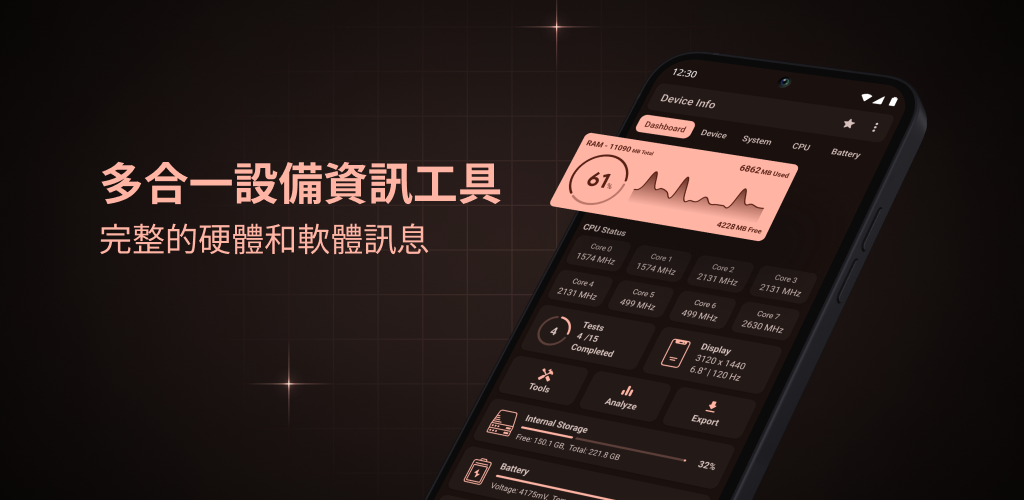
Device Info is a powerful hardware monitor, system monitor, and device information app trusted by over 1 million users, featuring a 4.75★ rating. Monitor your phone's CPU, GPU, RAM, battery health, storage, sensors, display, cameras, network connectivity (Wi-Fi, Bluetooth, and mobile data), and thermal performance in real time. Use it as your CPU monitor, RAM monitor, performance monitor, and device diagnostics tool. Benchmark your device and export detailed reports—all with zero tracking, no accounts, and no data collection. 📊 Dashboard Overview of CPU, RAM, battery, internal and external storage, sensors, and installed apps. 📱 Device Information & Phone Specs View model, manufacturer, brand, hardware, board, build fingerprint, device age, manufactured date, USB host support, SIM details, and network information. ⚙️ System Information Android version, API level, One UI version, security patch, kernel, Google Play services, Vulkan, OpenGL ES, system uptime, root apps, and language. 🎚️ CPU & GPU Monitor View SoC details including CPU architecture, supported ABIs, governor, core count, real-time CPU frequencies, GPU renderer, GPU vendor, GPU version, and graphics capabilities. 🔋 Battery Monitor Track battery health, level, charging status, temperature, voltage, current (mA), power (watts), technology, and estimated capacity. 🌐 Network & Connectivity View Wi-Fi, Bluetooth, NFC, Ultra-Wideband (UWB), USB, and mobile network information including IP address, gateway, DNS, frequency, Wi-Fi standard, security, and link speed. 📟 Display & Camera Display resolution, pixel density, refresh rate, HDR support, brightness, physical size, plus camera specifications including aperture, focal length, ISO range, RAW support, focus modes, flash modes, and image formats. 💾 RAM & Storage Monitor RAM usage, RAM type, RAM frequency, storage capacity, and internal and external storage with real-time statistics. 📡 Sensors View every available sensor including vendor, type, power usage, wake-up support, dynamic sensor support, and maximum range. 📚 Apps & App Analyzer View installed apps, permissions, activities, services, providers, receivers, signatures, minimum and target Android versions, extract APKs, and analyze apps with advanced graphs. 📶 Wi-Fi Analyzer Scan nearby Wi-Fi networks and analyze signal strength, channels, Wi-Fi standards, security protocols, and estimated distance. ☑️ Hardware Tests & Device Diagnostics Test display, multi-touch, flashlight, loudspeaker, earpiece, microphone, proximity sensor, light sensor, accelerometer, charging, headset, vibration, Bluetooth, fingerprint, and volume buttons. 🌡️ CPU Temperature & Thermal Monitor Track CPU, GPU, battery, and system temperatures using Android thermal sensors. 🪟 Floating Monitor & Material You Widgets Display floating overlays for RAM, battery, CPU temperature, and device statistics, or add customizable Material You widgets to your home screen. 🎨 Material You Themes Beautiful light and dark themes with dynamic colors. 📄 Export Reports Export complete device and system information as Text or PDF reports for diagnostics, troubleshooting, or technical support. 🛠️ Also Included Permission Analyzer • Data Usage Monitor • Compass ✅ PERFECT FOR • Tech enthusiasts who want to know every detail • Developers testing device compatibility • Repair technicians diagnosing hardware faults • Anyone buying or selling a used phone 🔒 100% Private No tracking, no accounts, and no data collection. Everything stays on your device. Download Device Info today and monitor your CPU, GPU, RAM, battery health, storage, sensors, network, and system performance with one powerful hardware monitor.
设备信息:系统和 CPU 信息
综合评分4.812.5w 条评价
下载热度10,000,000+多渠道官方分发
区服与平台国际服国际服 / 需加速
游戏精选截图与实机展示
点击截图可放大查看高清原始画质
版本与技术参数规格
应用包名
com.ytheekshana.deviceinfo
当前正式版本
3.4.4.0最新
更新日期
2026-08-03
安装包大小
11.97 MB (基础包)
发行厂商
Yasiru Nayanajith
区服/地区
国际服
游戏分类
工具
可用下载渠道
1 个
最新更新 (What's New)
版本 v3.4.4.0 · 更新于 2026-08-03
Theme colors are back for All Android versions. (Clear cache & data and start fresh) Improved Memory tab Added ZRam Bug fixes and performance improvements
游戏深度介绍 (About this Game)
Device Info is a powerful hardware monitor, system monitor, and device information app trusted by over 1 million users, featuring a 4.75★ rating.
Monitor your phone's CPU, GPU, RAM, battery health, storage, sensors, display, cameras, network connectivity (Wi-Fi, Bluetooth, and mobile data), and thermal performance in real time. Use it as your CPU monitor, RAM monitor, performance monitor, and device diagnostics tool. Benchmark your device and export detailed reports—all with zero tracking, no accounts, and no data collection.
📊 Dashboard
Overview of CPU, RAM, battery, internal and external storage, sensors, and installed apps.
📱 Device Information & Phone Specs
View model, manufacturer, brand, hardware, board, build fingerprint, device age, manufactured date, USB host support, SIM details, and network information.
⚙️ System Information
Android version, API level, One UI version, security patch, kernel, Google Play services, Vulkan, OpenGL ES, system uptime, root apps, and language.
🎚️ CPU & GPU Monitor
View SoC details including CPU architecture, supported ABIs, governor, core count, real-time CPU frequencies, GPU renderer, GPU vendor, GPU version, and graphics capabilities.
🔋 Battery Monitor
Track battery health, level, charging status, temperature, voltage, current (mA), power (watts), technology, and estimated capacity.
🌐 Network & Connectivity
View Wi-Fi, Bluetooth, NFC, Ultra-Wideband (UWB), USB, and mobile network information including IP address, gateway, DNS, frequency, Wi-Fi standard, security, and link speed.
📟 Display & Camera
Display resolution, pixel density, refresh rate, HDR support, brightness, physical size, plus camera specifications including aperture, focal length, ISO range, RAW support, focus modes, flash modes, and image formats.
💾 RAM & Storage
Monitor RAM usage, RAM type, RAM frequency, storage capacity, and internal and external storage with real-time statistics.
📡 Sensors
View every available sensor including vendor, type, power usage, wake-up support, dynamic sensor support, and maximum range.
📚 Apps & App Analyzer
View installed apps, permissions, activities, services, providers, receivers, signatures, minimum and target Android versions, extract APKs, and analyze apps with advanced graphs.
📶 Wi-Fi Analyzer
Scan nearby Wi-Fi networks and analyze signal strength, channels, Wi-Fi standards, security protocols, and estimated distance.
☑️ Hardware Tests & Device Diagnostics
Test display, multi-touch, flashlight, loudspeaker, earpiece, microphone, proximity sensor, light sensor, accelerometer, charging, headset, vibration, Bluetooth, fingerprint, and volume buttons.
🌡️ CPU Temperature & Thermal Monitor
Track CPU, GPU, battery, and system temperatures using Android thermal sensors.
🪟 Floating Monitor & Material You Widgets
Display floating overlays for RAM, battery, CPU temperature, and device statistics, or add customizable Material You widgets to your home screen.
🎨 Material You Themes
Beautiful light and dark themes with dynamic colors.
📄 Export Reports
Export complete device and system information as Text or PDF reports for diagnostics, troubleshooting, or technical support.
🛠️ Also Included
Permission Analyzer • Data Usage Monitor • Compass
✅ PERFECT FOR
• Tech enthusiasts who want to know every detail
• Developers testing device compatibility
• Repair technicians diagnosing hardware faults
• Anyone buying or selling a used phone
🔒 100% Private
No tracking, no accounts, and no data collection. Everything stays on your device.
Download Device Info today and monitor your CPU, GPU, RAM, battery health, storage, sensors, network, and system performance with one powerful hardware monitor.
Monitor your phone's CPU, GPU, RAM, battery health, storage, sensors, display, cameras, network connectivity (Wi-Fi, Bluetooth, and mobile data), and thermal performance in real time. Use it as your CPU monitor, RAM monitor, performance monitor, and device diagnostics tool. Benchmark your device and export detailed reports—all with zero tracking, no accounts, and no data collection.
📊 Dashboard
Overview of CPU, RAM, battery, internal and external storage, sensors, and installed apps.
📱 Device Information & Phone Specs
View model, manufacturer, brand, hardware, board, build fingerprint, device age, manufactured date, USB host support, SIM details, and network information.
⚙️ System Information
Android version, API level, One UI version, security patch, kernel, Google Play services, Vulkan, OpenGL ES, system uptime, root apps, and language.
🎚️ CPU & GPU Monitor
View SoC details including CPU architecture, supported ABIs, governor, core count, real-time CPU frequencies, GPU renderer, GPU vendor, GPU version, and graphics capabilities.
🔋 Battery Monitor
Track battery health, level, charging status, temperature, voltage, current (mA), power (watts), technology, and estimated capacity.
🌐 Network & Connectivity
View Wi-Fi, Bluetooth, NFC, Ultra-Wideband (UWB), USB, and mobile network information including IP address, gateway, DNS, frequency, Wi-Fi standard, security, and link speed.
📟 Display & Camera
Display resolution, pixel density, refresh rate, HDR support, brightness, physical size, plus camera specifications including aperture, focal length, ISO range, RAW support, focus modes, flash modes, and image formats.
💾 RAM & Storage
Monitor RAM usage, RAM type, RAM frequency, storage capacity, and internal and external storage with real-time statistics.
📡 Sensors
View every available sensor including vendor, type, power usage, wake-up support, dynamic sensor support, and maximum range.
📚 Apps & App Analyzer
View installed apps, permissions, activities, services, providers, receivers, signatures, minimum and target Android versions, extract APKs, and analyze apps with advanced graphs.
📶 Wi-Fi Analyzer
Scan nearby Wi-Fi networks and analyze signal strength, channels, Wi-Fi standards, security protocols, and estimated distance.
☑️ Hardware Tests & Device Diagnostics
Test display, multi-touch, flashlight, loudspeaker, earpiece, microphone, proximity sensor, light sensor, accelerometer, charging, headset, vibration, Bluetooth, fingerprint, and volume buttons.
🌡️ CPU Temperature & Thermal Monitor
Track CPU, GPU, battery, and system temperatures using Android thermal sensors.
🪟 Floating Monitor & Material You Widgets
Display floating overlays for RAM, battery, CPU temperature, and device statistics, or add customizable Material You widgets to your home screen.
🎨 Material You Themes
Beautiful light and dark themes with dynamic colors.
📄 Export Reports
Export complete device and system information as Text or PDF reports for diagnostics, troubleshooting, or technical support.
🛠️ Also Included
Permission Analyzer • Data Usage Monitor • Compass
✅ PERFECT FOR
• Tech enthusiasts who want to know every detail
• Developers testing device compatibility
• Repair technicians diagnosing hardware faults
• Anyone buying or selling a used phone
🔒 100% Private
No tracking, no accounts, and no data collection. Everything stays on your device.
Download Device Info today and monitor your CPU, GPU, RAM, battery health, storage, sensors, network, and system performance with one powerful hardware monitor.
游戏特色
- 提供国际服版本信息
- 当前版本:3.4.4.0
- 开发者:Yasiru Nayanajith
- 游戏标签:工具
攻略指南与常见问题
新手与进阶问答安装说明
- 1点击页面中的“立即下载”,优先选择更新日期较新的渠道资源。
- 2下载完成后,确认安装包大小与页面展示信息基本一致,再开始安装 设备信息:系统和 CPU 信息。
- 3首次安装第三方 APK 时,请根据设备系统提示授权安装权限。
下载与使用风险提示
- 安装前请核对包名 com.ytheekshana.deviceinfo 与目标应用是否一致,避免误装非目标版本。
- 若设备已安装同名旧版本,建议先确认版本兼容性,再决定覆盖安装或重新安装。
- 如下载来源异常或安装后行为异常,请暂停使用并重新核对下载渠道。
如何安装游戏?
ACBOX 是一款支持多种安装包格式的 Android 安装器,通常可用于安装 APK、APKS、XAPK、APKM 等格式。对于 APKS 游戏,ACBOX 可以解析其中的拆分 APK,并根据设备配置进行安装,比直接改后缀或使用普通文件管理器更方便。
什么是APKS格式的游戏?
A:APKS是一种Android应用/游戏的打包格式,本质上是一个ZIP压缩包,里面包含了一个基础APK文件和多个按设备配置拆分的APK(如针对不同CPU架构、屏幕密度、语言等)。它主要用于通过Google Play分发的大型游戏或应用,目的是减小单次下载体积,让设备只下载需要的部分。普通APK是一个“全量包”,而APKS是“拆分包”的集合。
APKS和普通APK有什么区别?
A:普通APK可以直接安装到Android设备;APKS不能直接安装,需要先用工具(如SAI、APKMirror Installer等)解析并安装其中的拆分APK。APKS通常包含多个APK文件,安装时由安装器根据设备配置选择合适的分包。简单说:APK是单文件安装包,APKS是多文件拆分安装包。
社区动态与玩家讨论
参与 设备信息:系统和 CPU 信息 专区讨论,结识同服战友